
Les Vaudoiseries
Client
Ville de Lausanne (agency work)
Role
Product Designer
Services
UX/UI Design
Design System
Web design
Year
2026
Les Vaudoiseries is built on a simple idea: pairing a Lausanne shop with a local creator to offer, for one weekend, a unique and festive experience in the heart of the city.
Each collaboration takes a different shape: an exclusive piece created together and sold in the shop, or a live workshop hosted during the weekend. The goal is simple: bring people back into local shops, and help the region's creators get known.
A design process with AI, documented
Client
Ville de Lausanne (agency work)
Role
Product Designer
Services
UX/UI Design
Design System
Web design
Year
2025
Context
Les Vaudoiseries is built on a simple idea: pairing a Lausanne shop with a local creator to offer, for one weekend, a unique and festive experience in the heart of the city.
Each collaboration takes a different shape: an exclusive piece created together and sold in the shop, or a live workshop hosted during the weekend. The goal is simple: bring people back into local shops, and help the region's creators get known.
A website to connect Lausanne's shops, local creators and the public.
A website to connect Lausanne's shops, local creators and the public.

Brief & Design Thinking
Understanding the event and its users: visitors, shops, creators, and what the site must do.
Brief & Design Thinking
Understanding the event and its users: visitors, shops, creators, and what the site must do.

Structure & Wireframes
Sitemap and low-fidelity wireframes to test the navigation logic before any visual design.
Structure & Wireframes
Sitemap and low-fidelity wireframes to test the navigation logic before any visual design.

UI Design & Design System
The visual language of the platform, built as a Figma system: variables, components, states.
UI Design & Design System
The visual language of the platform, built as a Figma system: variables, components, states.

Social Media
A set of templates to announce each collaboration and grow the audience before the launch.
Social Media
A set of templates to announce each collaboration and grow the audience before the launch.

Wireframes
Wireframes
I wireframed the key pages in low fidelity to test the structure: the homepage, the collaborations index, and the three dynamic pages. No visual design at this stage, just layout and hierarchy.
I wireframed the key pages in low fidelity to test the structure: the homepage, the collaborations index, and the three dynamic pages. No visual design at this stage, just layout and hierarchy.


UI Design & Design System
UI Design & Design System
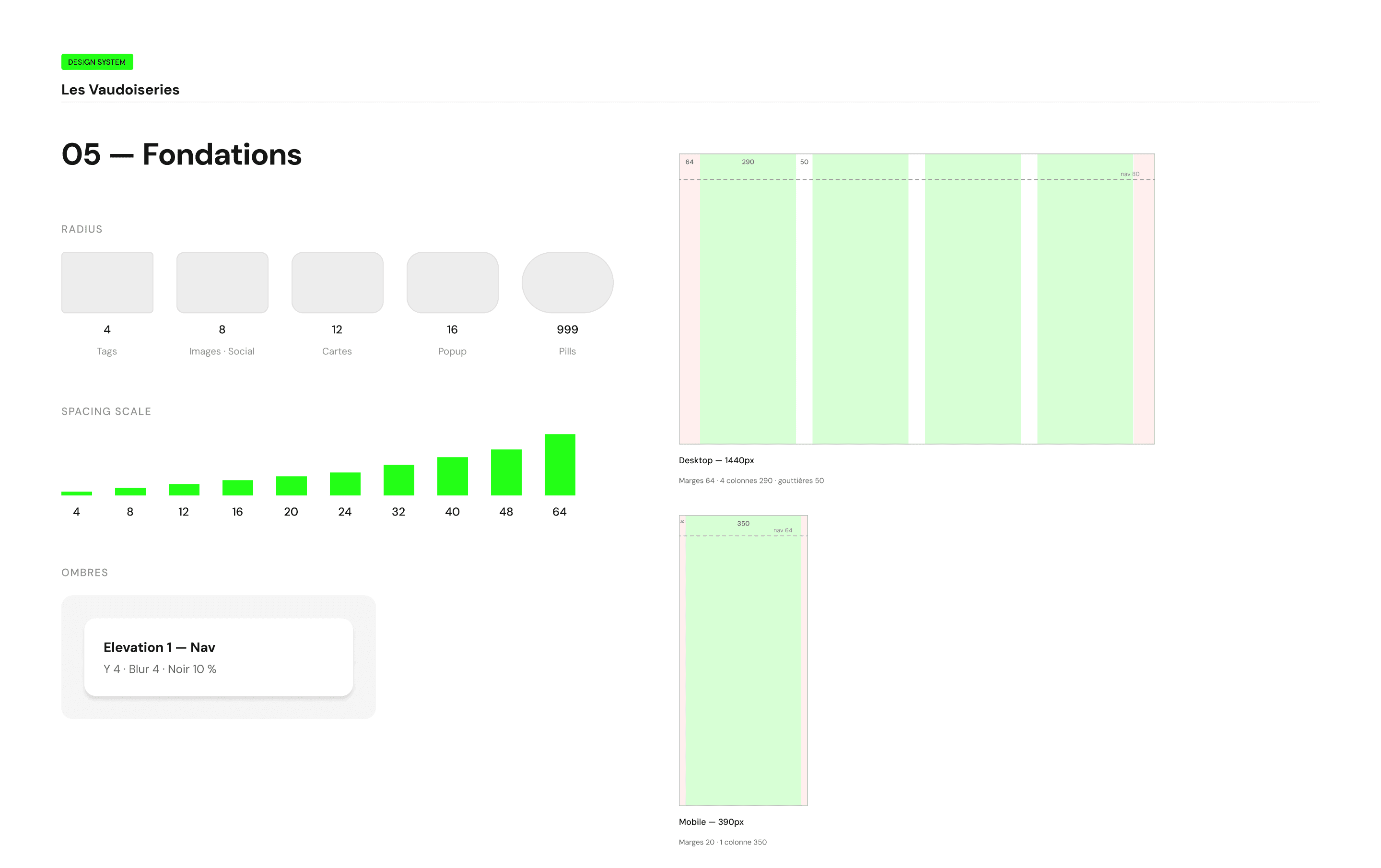
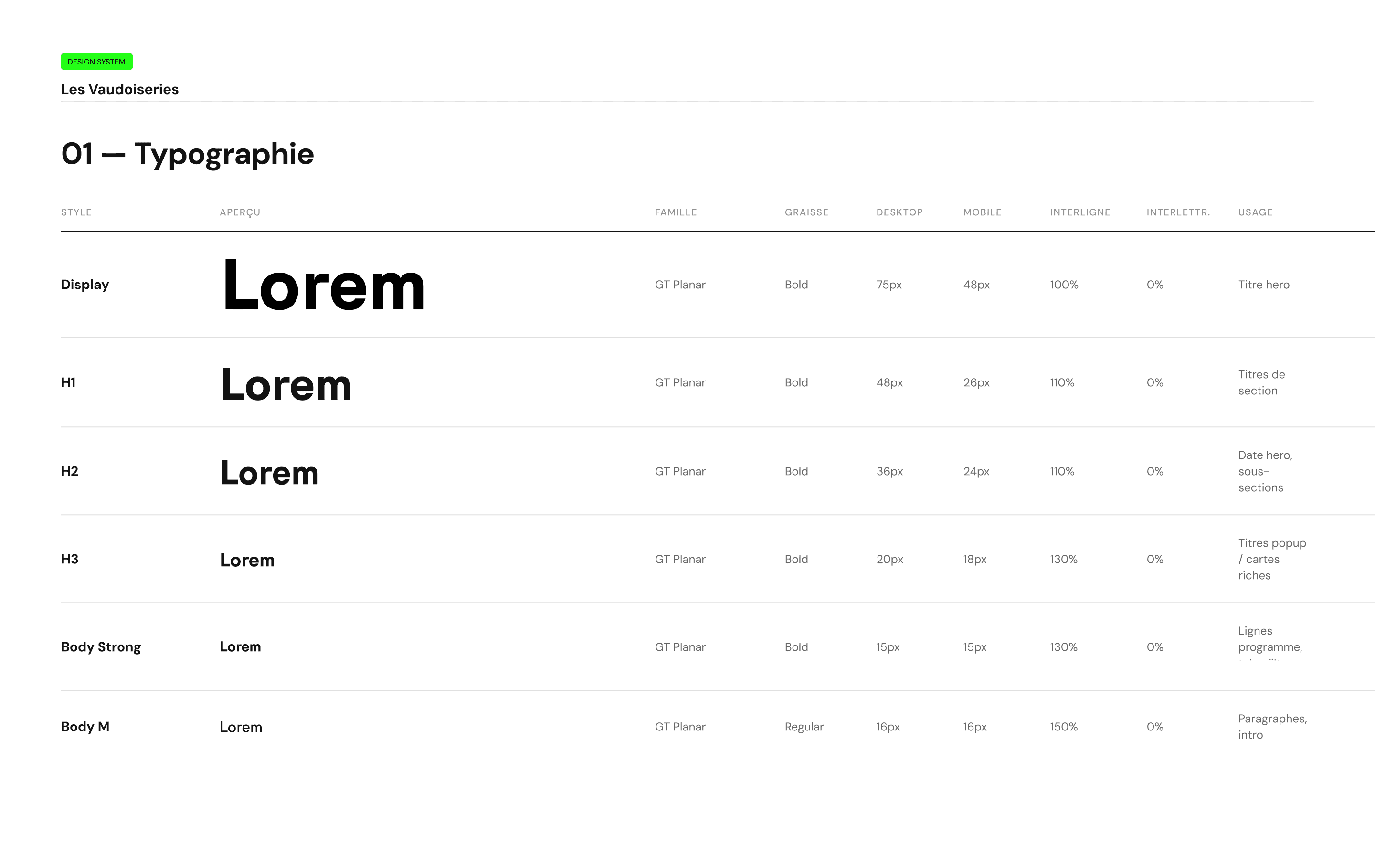
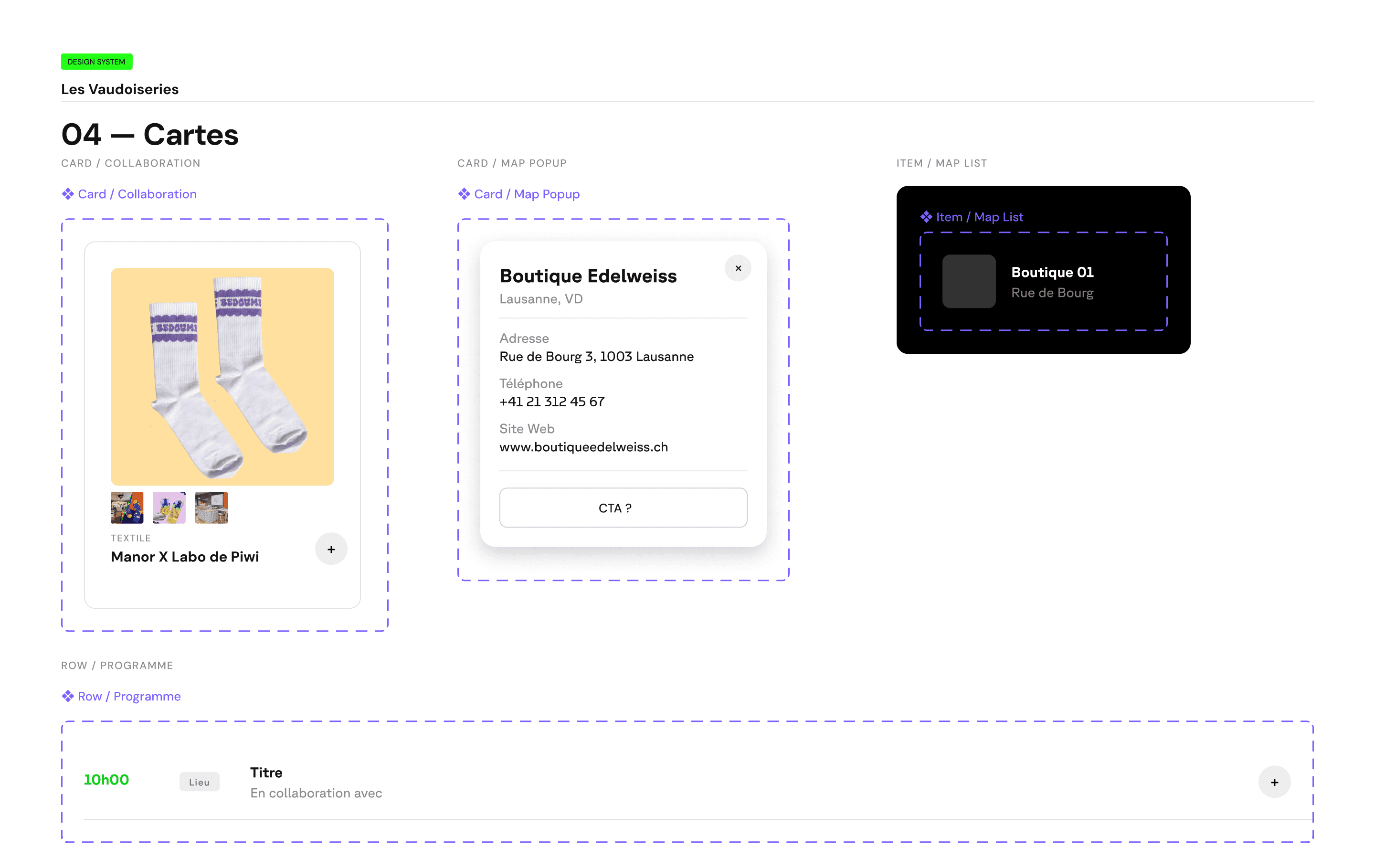
The visual language had to feel festive and local, without looking like a classic institutional website. Everything was built as a system in Figma: color and typography variables, components with their variants and states, and the three dynamic page templates ready for the dev handoff.
The visual language had to feel festive and local, without looking like a classic institutional website. Everything was built as a system in Figma: color and typography variables, components with their variants and states, and the three dynamic page templates ready for the dev handoff.




The Challenge
The Challenge
One template for every type of page
The site needed a page for every collaboration, every creator and every shop. Three types of content with very different needs: a collaboration is about a duo and a creation, a creator page is about a person and their work, a shop page is about a place and what happens there.
Designing each page by hand was not an option: the content arrives progressively, and nobody will be there to design every new page. So the challenge was to build one single template logic, made of fields that fit together like building blocks. The same blocks, tag, title, text, image, link, adapt to any type of content. Once the fields are filled, the page builds itself automatically.
One template for every type of page
The site needed a page for every collaboration, every creator and every shop. Three types of content with very different needs: a collaboration is about a duo and a creation, a creator page is about a person and their work, a shop page is about a place and what happens there.
Designing each page by hand was not an option: the content arrives progressively, and nobody will be there to design every new page. So the challenge was to build one single template logic, made of fields that fit together like building blocks. The same blocks, tag, title, text, image, link, adapt to any type of content. Once the fields are filled, the page builds itself automatically.

The result
The result
The final site works like an e-commerce platform, with one big difference: nothing is for sale online. The creations can only be discovered and bought on site, during the event. So every page is designed to trigger a visit, not a purchase. The product page logic is there, photos, price, availability, but the call to action is simply: come and see it.
The interactive map turned out to be one of the most useful parts of the site. It connects everything: from any collaboration you can locate the shop, and from the map you can jump to any page. Simple to use, and exactly what you need when you are walking through the city during the event weekend.
What could be improved
Since this is the first edition, some ideas stayed on the table. The main one: letting visitors create an account, save their favorite collaborations and build their own route through the city. It was not integrated this time, for reasons of time and budget, but it is noted for the next editions.
The final site works like an e-commerce platform, with one big difference: nothing is for sale online. The creations can only be discovered and bought on site, during the event. So every page is designed to trigger a visit, not a purchase. The product page logic is there, photos, price, availability, but the call to action is simply: come and see it.
The interactive map turned out to be one of the most useful parts of the site. It connects everything: from any collaboration you can locate the shop, and from the map you can jump to any page. Simple to use, and exactly what you need when you are walking through the city during the event weekend.
What could be improved
Since this is the first edition, some ideas stayed on the table. The main one: letting visitors create an account, save their favorite collaborations and build their own route through the city. It was not integrated this time, for reasons of time and budget, but it is noted for the next editions.


Social Media
Social Media
How do you announce the event without putting any shop or creator forward, and without real visuals, since the creations do not exist yet?
The answer: talk about the savoir-faire instead of the names. I designed carousels organized by craft families. Each slide lists the crafts visitors will encounter, without revealing who does what.
How do you announce the event without putting any shop or creator forward, and without real visuals, since the creations do not exist yet?
The answer: talk about the savoir-faire instead of the names. I designed carousels organized by craft families. Each slide lists the crafts visitors will encounter, without revealing who does what.


